
Please Note: This article is written for users of the following Microsoft Excel versions: 2007, 2010, 2013, 2016, 2019, and 2021. If you are using an earlier version (Excel 2003 or earlier), this tip may not work for you. For a version of this tip written specifically for earlier versions of Excel, click here: Setting Stable Column Widths in a PivotTable.

Written by Allen Wyatt (last updated July 3, 2021)
This tip applies to Excel 2007, 2010, 2013, 2016, 2019, and 2021
Stuart has been building PivotTables for a charity so that they can report on donation patterns over time. The problem he has is that he wants to permanently set the column widths in his PivotTable, but whenever the filter variables for the PivotTable are changed, the column widths reset themselves. Stuart wonders how he can permanently fix all column widths in the PivotTable so they don't change.
This is very easy to do in Excel. After your PivotTable is set up and formatted just the way you want, follow these steps if you are using Excel 2013 or a later version:
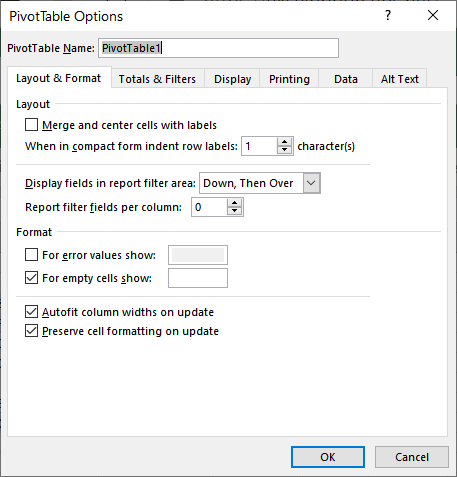
Figure 1. The Layout & Format tab of the PivotTable Options dialog box.
If you are using Excel 2007 or Excel 2010 follow these steps instead:
ExcelTips is your source for cost-effective Microsoft Excel training. This tip (759) applies to Microsoft Excel 2007, 2010, 2013, 2016, 2019, and 2021. You can find a version of this tip for the older menu interface of Excel here: Setting Stable Column Widths in a PivotTable.
Create Custom Apps with VBA! Discover how to extend the capabilities of Office 365 applications with VBA programming. Written in clear terms and understandable language, the book includes systematic tutorials and contains both intermediate and advanced content for experienced VB developers. Designed to be comprehensive, the book addresses not just one Office application, but the entire Office suite. Check out Mastering VBA for Microsoft Office 365 today!
Are you attached to the classic PivotTable layout? Looking for a way to make that layout the default for new PivotTables? ...
Discover MoreYou can format PivotTables using either manual formatting or automatic formatting. You need to be careful, however, as ...
Discover MorePivotTables can be a great tool for analyzing large amounts of data. If you have a PivotTable that is pulling information ...
Discover MoreFREE SERVICE: Get tips like this every week in ExcelTips, a free productivity newsletter. Enter your address and click "Subscribe."
2022-01-14 04:27:44
Andy
Hi, I have done everything as described and it works. However, the following is still happening and I am trying to find a solution to it:
Pivot Column headers set to "-90" (VBA), WordWrap set to false (VBA), RowHeight adjusted to 200 (VBA): When you use a slicer for the field that you use for the column headers and update the slicer selection, the row height will automatically adjust to fit.
I don't want that. Can that be prevented?
Thx, Andy
Got a version of Excel that uses the ribbon interface (Excel 2007 or later)? This site is for you! If you use an earlier version of Excel, visit our ExcelTips site focusing on the menu interface.
FREE SERVICE: Get tips like this every week in ExcelTips, a free productivity newsletter. Enter your address and click "Subscribe."
Copyright © 2026 Sharon Parq Associates, Inc.
 Please Note:
This article is written for users of the following Microsoft Excel versions: 2007, 2010, 2013, 2016, 2019, and 2021. If you are using an earlier version (Excel 2003 or earlier), this tip may not work for you. For a version of this tip written specifically for earlier versions of Excel, click here:
Please Note:
This article is written for users of the following Microsoft Excel versions: 2007, 2010, 2013, 2016, 2019, and 2021. If you are using an earlier version (Excel 2003 or earlier), this tip may not work for you. For a version of this tip written specifically for earlier versions of Excel, click here:
Comments