
Please Note: This article is written for users of the following Microsoft Excel versions: 2007, 2010, 2013, 2016, 2019, 2021, and Excel in Microsoft 365. If you are using an earlier version (Excel 2003 or earlier), this tip may not work for you. For a version of this tip written specifically for earlier versions of Excel, click here: Adjusting Cell Margins for More White Space.

Written by Allen Wyatt (last updated August 10, 2024)
This tip applies to Excel 2007, 2010, 2013, 2016, 2019, 2021, and Excel in Microsoft 365
Serena asked if there is a way to adjust the text margins with a cell so that there is more white space within a cell. The answer is that there is no intrinsic Excel command to add more space, as you can do in Word tables or with the CELLPADDING attribute in an HTML table. However, there are a couple of ways you can accomplish the desired goal, although it is somewhat more manual in nature. The first possible approach is to follow these general steps:
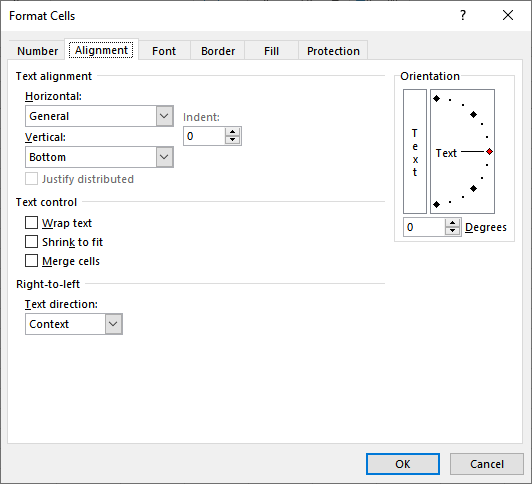
Figure 1. The Alignment tab of the Format Cells dialog box.
You'll want to experiment with the settings you use to get the exact look you want.
ExcelTips is your source for cost-effective Microsoft Excel training. This tip (11498) applies to Microsoft Excel 2007, 2010, 2013, 2016, 2019, 2021, and Excel in Microsoft 365. You can find a version of this tip for the older menu interface of Excel here: Adjusting Cell Margins for More White Space.
Best-Selling VBA Tutorial for Beginners Take your Excel knowledge to the next level. With a little background in VBA programming, you can go well beyond basic spreadsheets and functions. Use macros to reduce errors, save time, and integrate with other Microsoft applications. Fully updated for the latest version of Office 365. Check out Microsoft 365 Excel VBA Programming For Dummies today!
Excel allows you to apply all sorts of formatting to the data in your worksheets. If you want to get rid of all that ...
Discover MoreNeed to replace the formats applied to some cells with a different format? You can use Excel's Find and Replace tool to ...
Discover MoreExcel often changes the formatting of a cell based on how it parses what you are entering into that cell. This is ...
Discover MoreFREE SERVICE: Get tips like this every week in ExcelTips, a free productivity newsletter. Enter your address and click "Subscribe."
There are currently no comments for this tip. (Be the first to leave your comment—just use the simple form above!)
Got a version of Excel that uses the ribbon interface (Excel 2007 or later)? This site is for you! If you use an earlier version of Excel, visit our ExcelTips site focusing on the menu interface.
FREE SERVICE: Get tips like this every week in ExcelTips, a free productivity newsletter. Enter your address and click "Subscribe."
Copyright © 2026 Sharon Parq Associates, Inc.
 Please Note:
This article is written for users of the following Microsoft Excel versions: 2007, 2010, 2013, 2016, 2019, 2021, and Excel in Microsoft 365. If you are using an earlier version (Excel 2003 or earlier), this tip may not work for you. For a version of this tip written specifically for earlier versions of Excel, click here:
Please Note:
This article is written for users of the following Microsoft Excel versions: 2007, 2010, 2013, 2016, 2019, 2021, and Excel in Microsoft 365. If you are using an earlier version (Excel 2003 or earlier), this tip may not work for you. For a version of this tip written specifically for earlier versions of Excel, click here:
Comments